Stop surprise SaaS renewals.
Asozal tracks each vendor's renewal date and notice deadline, emails the renewal owner before the window closes, and builds a renewal brief from your own spend, pricing and alert history — so you renew, negotiate or cancel on your terms. No SSO integration, no IT project.
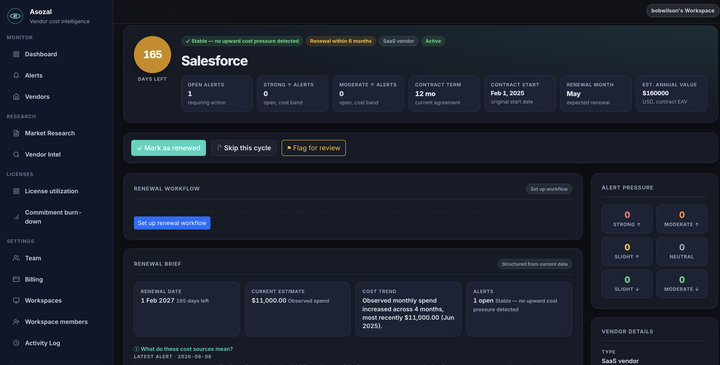
Renewals you'd otherwise find on the invoice
Auto-renewals rarely announce themselves. Asozal keeps the dates, reminds the right person and has the facts ready.
Renewal dates and notice deadlines
Record each vendor's renewal date, notice deadline, auto-renewal and owner once. Asozal counts down to both, so a notice window doesn't close unnoticed.
Reminders before the window closes
Daily checks flag renewals in the next 90 days, notice deadlines in the next 30, and vendors with no renewal owner — in Asozal and by email to the person responsible.
A renewal brief for every vendor
Spend, cost history, alerts and contract notes on one page, with suggested asks, risks and Stay / Negotiate / Switch scenarios drawn from your own data.
Price increases, timed to your renewal
When a vendor raises its published prices, you get an alert with the size of the change and how long until your renewal.
How it works
Three steps, no integration.
Add your vendors and contract dates
Pick vendors from a catalog of 370+ SaaS and cloud vendors, or add your own, then enter the renewal date, notice deadline and owner. Nothing to install or connect.
Asozal watches the dates
Every day it checks renewals and notice deadlines and alerts the renewal owner; every week it checks the vendors' published pricing.
Walk in with a plan
Open the renewal brief, track tasks and asks in the renewal workflow, then mark the vendor renewed, skipped or flagged for review.
Frequently asked questions
About renewal tracking in Asozal.
What does Asozal track for each renewal?
The renewal date (entered directly, or worked out from the contract start and term), the notice deadline, whether the contract auto-renews, the renewal owner, contract notes and details such as tiers and fees, and the spend you record each month.
When will I get a reminder?
Asozal checks every day. You get an alert when a renewal is within 90 days, when a notice deadline is within 30 days or has passed, when a vendor renewing soon has no renewal owner, and when a renewal is coming up with no recent spend on file to negotiate from.
Who gets the emails?
The vendor's renewal owner. If no owner is set, your workspace owners and admins get them instead. Every reminder is also in your Alerts list and on the vendor's renewal page.
What's in the renewal brief?
Time to renewal and notice deadline, the vendor's cost signal and history, recent alerts and contract notes, plus suggested asks, risks and Stay / Negotiate / Switch scenarios. Each suggestion comes from a specific fact in your workspace, not a generic template.
Do I need to connect SSO, billing or an API?
No. You enter each vendor's contract dates once and Asozal does the rest. There's nothing to integrate and no admin access to grant.
What about vendors that change their prices?
Asozal also checks vendors' published pricing every week and alerts you when a vendor you use changes it, with your renewal date alongside. You can browse the vendor price tracker without an account.
How much does Asozal cost?
You can start with a free trial. Plans and limits are on the pricing page.
Know every renewal and notice deadline before it arrives.
Add the vendors you already pay for and Asozal starts watching the dates.
Start tracking renewals free